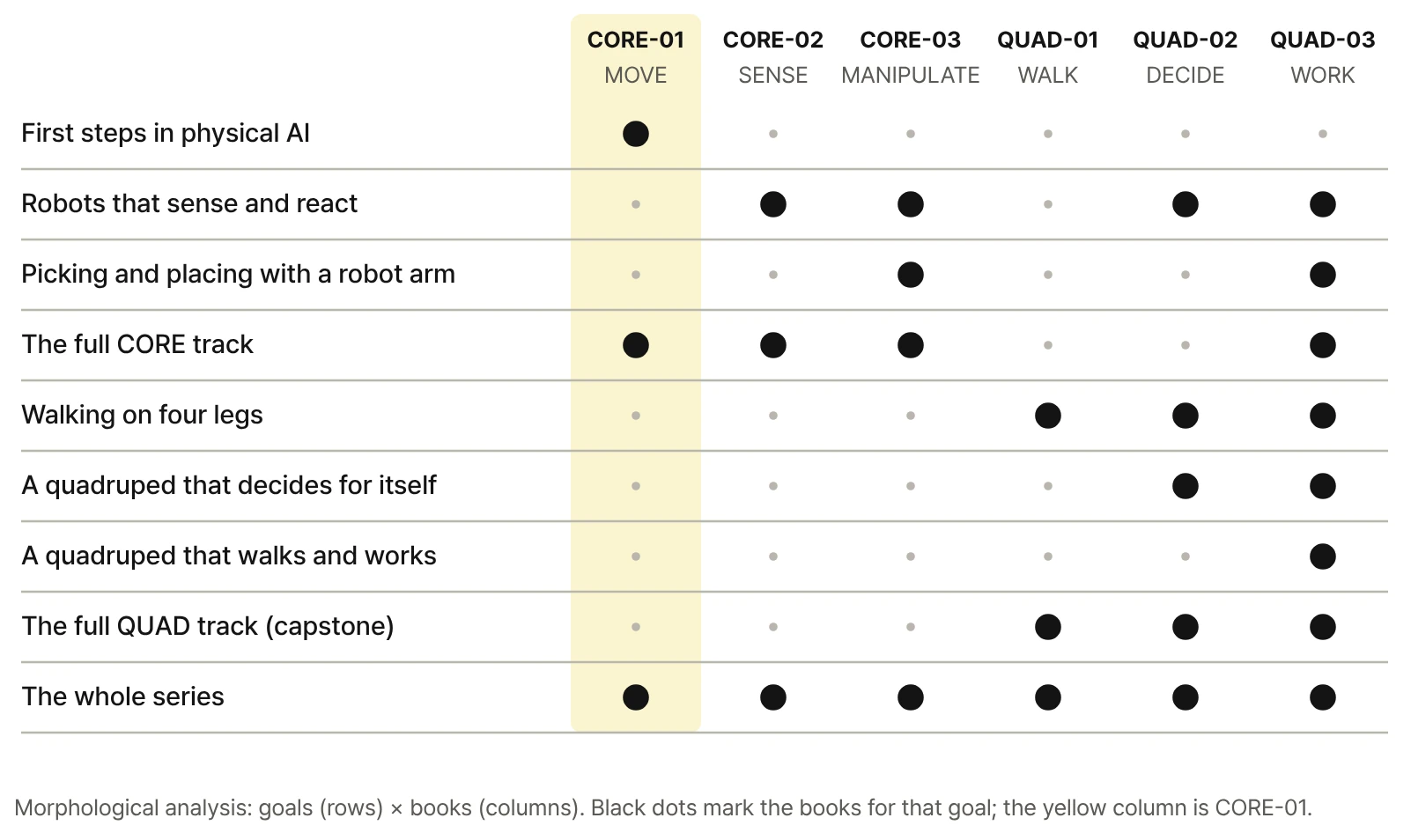
This page shows how to combine the six books for different goals, with sample schedules for elementary, middle, and high school, college, and adult learners. Anything that includes CORE-01 is highlighted.
Each book runs on its own robot files, start file, and library. The combinations below are recommended connections by goal, not prerequisites.
The six books
CORE track · foundation MOVE → SENSE / REACT → MANIPULATE
Grayed-out books aren't out yet. Until they are, start with the published ones.
Course plans by level
These schedules are suggestions; merge or split sessions to fit your hours and learners. Each student computer needs its own copy of RoboCo from Steam.
A four-wheel guide-mission report and a quadruped walking result
Unit
Activity
Book scope
1
Setup and first drive
CORE-01 Getting Started · CH01–02
2
Speed, terrain, status, first mission
CORE-01 CH03–05
3
Motors, servos, Ports, control paths
CORE-01 CH06–08
4
Commands vs. motion, wheel combinations
CORE-01 CH09–10
5
Start file, input, motor grouping
CORE-01 CH11–13
6
Servo ranges and reading the LOG
CORE-01 CH14–15
7
Single-variable experiments and report
CORE-01 PART 4
8
Four-wheel final mission presentation
CORE-01 PART 5
9
First steps and postures of the quadruped
QUAD-01 PART 1
10
Twelve joints and coordinate frames
QUAD-01 PART 2
11
Foot targets and IK
QUAD-01 CH11–13
12
Workspace and body posture
QUAD-01 CH14–15
13
Comparing stable postures
QUAD-01 CH16–18
14
Foot paths, stride, gait cycle
QUAD-01 CH19–20
15
Gait order, turning, recovery
QUAD-01 CH21–24
16
Quadruped final mission presentation
QUAD-01 CH25
Until QUAD-01 is published, weeks 9–16 can run as a CORE-01 extension (web challenges and experiment reports) or switch to the sensor track (CORE-01 → CORE-02).
From there, follow your interest: sensors (CORE-02), robot arms (CORE-03), or walking (QUAD-01).
Sample assessment criteria
Grade the motion, the explanation, the comparison, and the improvement, not how many lines of code there are.
Did the robot move as intended?
Can the student explain why, using the control structure?
Did they record the one value changed and the before/after result?
Did they find the failing step in the Console LOG?
Did they fix one condition and succeed again?
Ready-made forms: use Sheet 1 (Part 4 setting comparison) and Sheet 2 (Part 5 mission check) as lab reports, and Sheet 3 (challenges) as an extension task. Download the A4 record sheets (PDF)
Start with the first book
Whichever set you choose, the loop you learn in CORE-01 (input, control, motion, observation) is the foundation.